
Print size calculator
Print Size Calculator is a tool that helps you design images for printing with optimal size and resolution. Whether you plan to print a sticker, flyer, poster, banner or t-shirt print, our calculator provides the right DPI parameters for each type of printed media. Simply select your media type, enter your dimensions and units, and our tool will suggest the best DPI resolution for you. You can also add a bleed area to your design, which is especially important for stickers and flyers. Our Print Size Calculator is an essential tool for any graphic designer – amateur or professional.

DPI resolution calculator
Determine the optimal resolution for your graphic design

Print size calculator
Calculate image sizes for printing

Check image quality
Check graphics quality for printing in different formats
Calculate the size of the image for printing:
Example of calculator use:
How many pixels is an A4 sheet of paper?
Suppose, for example, that you plan to design an A4-size flyer. You select ‘flyer’ as the media type, enter the dimensions of the A4 sheet, which is 210mm by 297mm, and then select ‘millimeters’ as the unit. The calculator automatically suggests a resolution of 300 DPI, which is ideal for flyers. When you press the ‘Calculate’ button, the calculator tells you that an A4 sheet is 2480 pixels by 3508 pixels for the best print quality. This is the answer to your question, how many pixels is an A4 sheet of paper!
How many pixels is 1cm?
If you’re wondering how many pixels are 1 centimeter, our tool will show you that too. All you have to do is enter 1 centimeter as the dimension, select ‘centimeters’ as the unit and set the resolution to 300 DPI. After pressing the ‘Calculate’ button, the calculator will show that 1 centimeter corresponds to 118 pixels at this resolution. With our Print Size Calculator, you’ll never have to guess again how many pixels a print graphic should have.
What resolution is the graphic in Canva?
In Canva, the default resolution for graphics is 96dpi. In some cases, this is not enough to achieve high quality printing. To get the best result, we recommend enlarging the dimensions of the graphic. Our image size calculator will help you calculate the correct dimension of your graphic in pixels and centimeters. You can use it to assess whether the dimensions of the graphics are suitable for printing your design.
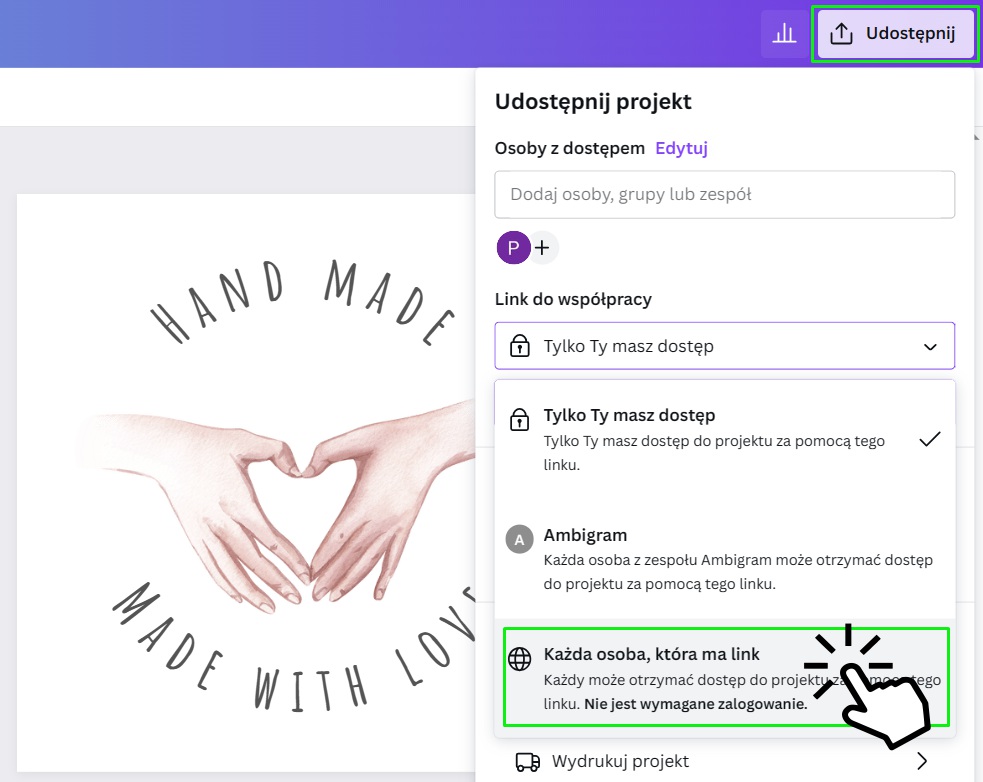
Resizing in Canva may require a premium account. If you are using the free version of Canva, share the editing link with us and we will download the graphic ourselves in the highest possible quality.
Frequently Asked Questions:
DPI stands for “dots per inch” or “pixels per inch,” and is a measure that determines how much detail can be printed on an image. The higher the DPI value, the higher the print quality.
It depends on the type of media you intend to print on. For stickers, flyers, t-shirt printing, we recommend 300 DPI. For posters, 150 DPI is sufficient, and for banners, 72 DPI is adequate.
For stickers and flyers, we recommend adding printing bleeds of 2mm per side. Also remember the inner margin, which should be at least 3 millimeters. You can read more about it in this article.
It depends on the project. Vector graphics are best for large formats and simple designs with clean lines and colors like company logos. Bitmap (raster) graphics are better for more complex projects, such as photographs and graphics for social media.
Yes, file compression can affect print quality. We recommend using file formats that minimize compression losses, such as TIFF or PNG.
Commonly used professional programs include Adobe Illustrator for vector graphics, Adobe Photoshop for bitmap (raster) graphics and Adobe InDesign for page layout and typography. Other popular programs include CorelDraw for vector graphics and Canva, which combines elements of vector and bitmap graphics.